VerseGuide Desktop
A companion app for Star Citizen. Type /showlocation in the game's chat and the location
lands in your VerseGuide account. Send directions from VerseGuide and they show over the game.
Free
Windows 10 & 11
Linux (Wine)
Open source, MIT
Microsoft Store: signed by Microsoft, updates itself. GitLab: the latest release (Windows, and Linux for Star Citizen's Wine setup) and the source code.
How it works
- Install the app from the Microsoft Store, or get the latest release on GitLab, and start it.
- Connect it to your VerseGuide account: scan the QR code in the app with your phone, or open the link in your browser, sign in and press Connect.
- In Star Citizen, type
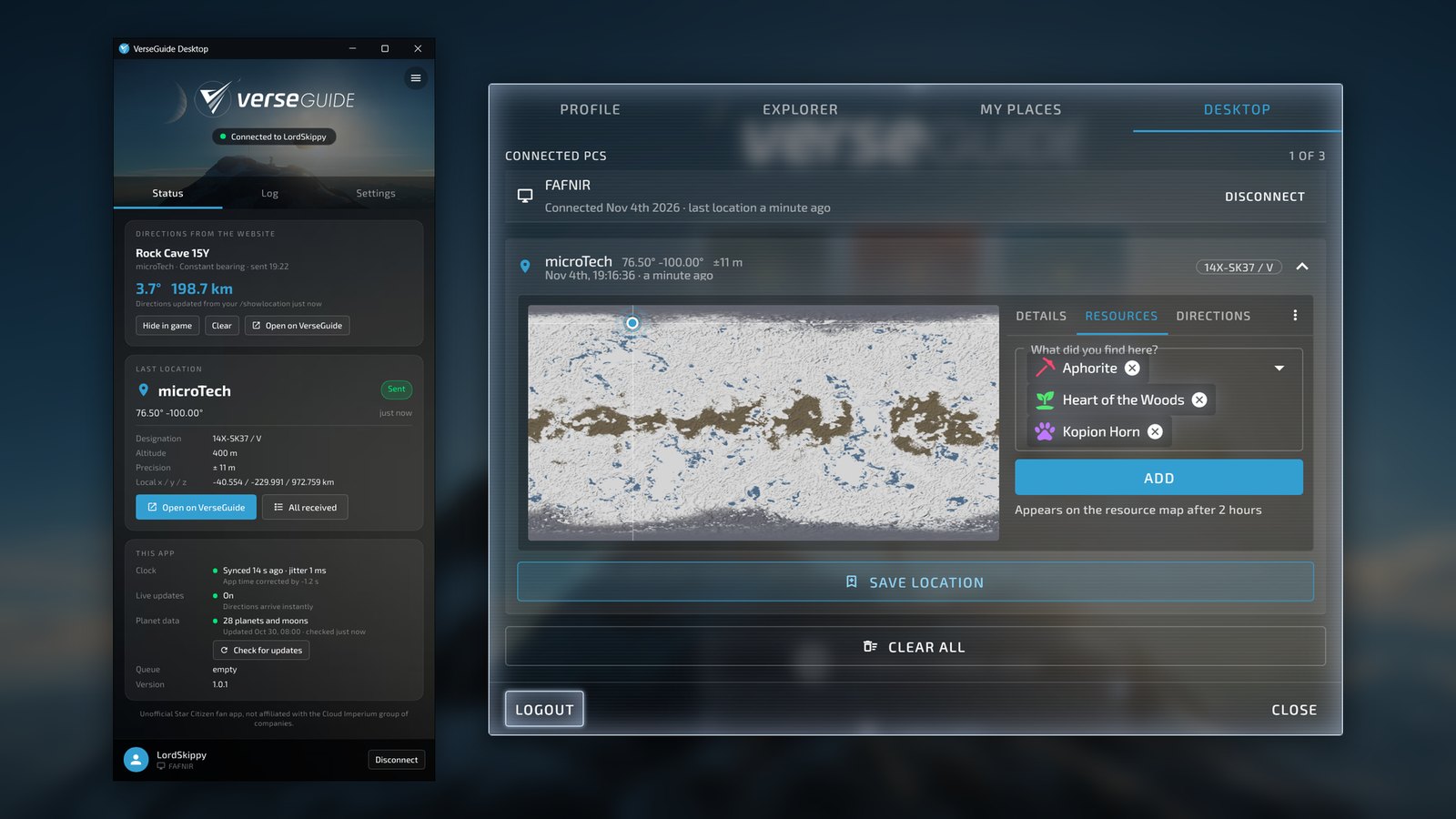
/showlocationin the chat and press Enter. The game copies your position to the clipboard; the app sends it to your account and confirms it with a card over the game. - On VerseGuide, Profile → Desktop lists your latest locations: open one on the map, save it to My places, report what you found there, or get directions and send them to the game.
Over the game
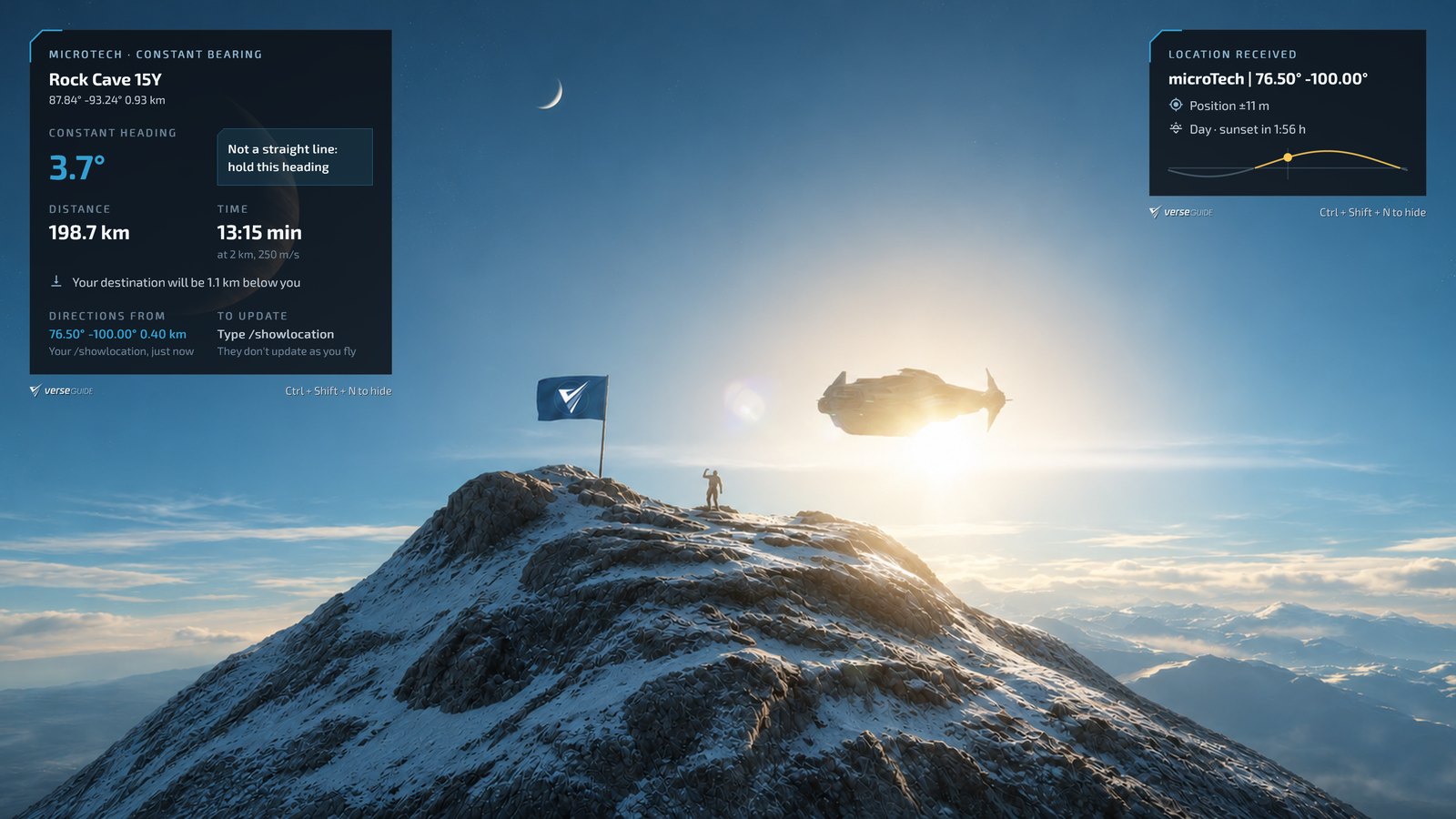
Location card
Planet or moon, latitude and longitude, how precise the position is, then the next sunrise or sunset at that spot.
Directions
Heading, distance and travel time by constant bearing, line of sight or orbital markers. Each new /showlocation works them out again from where you are.
Arrival
How far above or below the destination you are, and the distances to the orbital markers and nearest quantum beacons to check against.
Out of the way
Cards only while the game is in front. They never take focus and clicks go through. Ctrl+Shift+N hides and shows them.
Fits your screen
Corner, zoom and screen offset, for large and ultrawide screens.
Live
Directions sent from VerseGuide arrive in a second, without the app asking again and again.
On VerseGuide
Privacy
What the app reads, sends and keeps, and what it doesn't. The code is public under the MIT license, so all of this can be checked in the source.
Clipboard: only Star Citizen, only /showlocation
The app reads the clipboard only when StarCitizen.exe wrote to it. Text copied by any other program is never read. Of the game's text it uses only the /showlocation line; anything else is ignored.
Nothing happens on its own
A location is sent only after you type /showlocation yourself. The app does not track you between commands.
No access to the game
It does not read the game's files, memory or screen. It only checks which program is in front (to show the cards over the game) and which program wrote to the clipboard.
In-game positions only
Sent: the planet or moon, the game's coordinates and what is worked out from them (latitude, longitude, altitude, designation), how precise they are, the time and how far your clock is off, which of your computers sent it, and the app and planet data versions. Never your real-world location.
The last 20 locations
VerseGuide keeps your last 20 locations. Remove single ones or all of them in Profile → Desktop; deleting your account deletes them.
Keyboard: one shortcut
The app listens only for its own hide / show shortcut. No keystrokes are recorded or sent.
Talks to VerseGuide and a time server
Your account, directions, the planet data and the version check, all on VerseGuide; and time.cloudflare.com (changeable) for an exact clock, which sees your IP address.
No ads, no statistics
No advertising, no usage tracking. Settings, the log and the sign-in (in Windows Credential Manager) stay on your computer.
The full privacy policy has a section on VerseGuide Desktop.
Good to know
- Requirements: a free VerseGuide account; Windows 10 (version 2004 or later) or Windows 11, 64-bit; or Linux with Star Citizen in Wine (for example the LUG Helper's setup); the app runs in the same Wine prefix.
- Send limits: 5 locations a minute, 50 an hour and 360 a day per account. The app says when it can send again.
- Offline: up to 10 locations wait (at most 30 minutes) and are sent when the connection is back.
- Updates: when VerseGuide changes in a way an older version can't follow, the app says Update required with links to the Microsoft Store and the download, and pauses sending until it is updated.
- Several computers: up to 3 per account, each with its own name; disconnect them in the app or in Profile → Desktop.